Today: 9:00AM - 8:00PM
Search Sell/Trade Financing
Blog / Kia Telluride

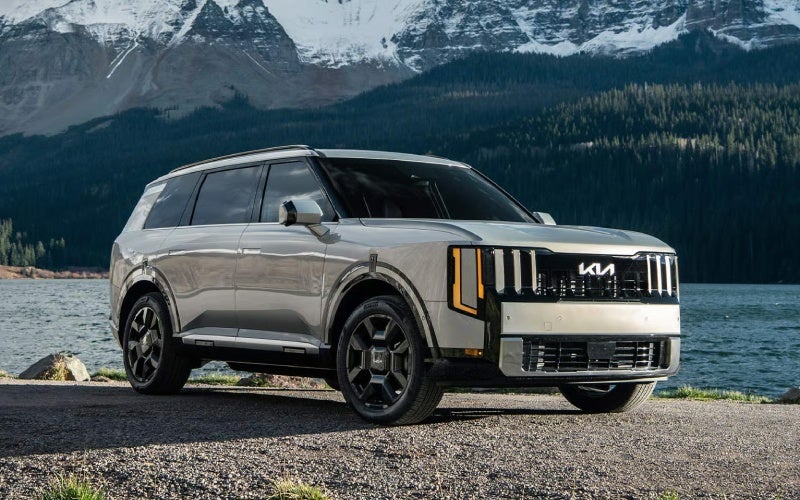
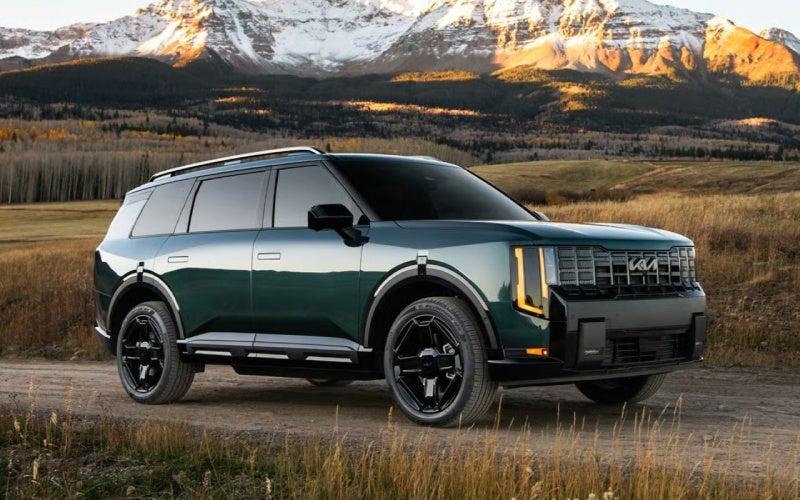
Is the 2027 Kia Telluride X-Pro the right SUV for winter and unpaved roads around Glenside, PA?

Is the 2027 Kia Telluride X-Pro the right SUV for winter and unpaved roads around Glenside, PA?

Matt Blatt Kia of Abington - Is the 2027 Kia Telluride X-Pro the right SUV for winter and unpaved roads around Glenside, PA?

Shoppers who split time between weekday commutes and weekend adventures often ask how the 2027 Kia Telluride handles snow, slush, and rutted gravel. The answer lies in a carefully engineered mix of traction, visibility, and control systems that are easy to use and confidence-inspiring when the weather turns or the pavement ends. This is especially relevant if your regular loop includes steep neighborhood streets, unplowed driveways, or trailheads near state parks around Glenside, PA.

Start with the foundation: available All-Wheel Drive w/ Terrain Mode. With Snow, Sand, and Mud settings, Terrain Mode helps distribute torque proactively across the axles and, in select trims, pairs with an Electronic Limited Slip Differential (E-LSD) to send power to the wheel that can use it best. That means fewer wheelspin moments and more controlled, progressive forward motion when low-traction surfaces would otherwise stall progress. If your plans include unmaintained lots in ski season or weekend runs to cabin roads, the X-Pro’s 9.1-in. ground clearance and all-terrain tires provide extra buffer against deep snow or uneven surfaces, while front and rear recovery hooks add assurance when conditions are unpredictable.

On tricky approaches, being able to see what you are rolling over matters as much as traction. The X-Pro’s available Ground View Monitor shows the terrain around your vehicle at low speeds, and the Off-Road Display gives select off-road status data so you can read the surface and set your line precisely. For daily practicality in tight winter parking lots, the 360° Surround View Monitor and Full Display Digital Rearview Mirror help you see around snowbanks and keep rearward visibility clear even when cargo or passengers fill the cabin.

Control and composure are just as important as raw traction. Available self-leveling rear suspension helps keep the Telluride at optimal ride height under load—useful if you are carrying skis, boards, or a full crew—and contributes to even headlight aim on dark, snowy drives. On the highway, available Highway Driving Assist 2 supports lane centering and helps maintain distance to the vehicle ahead on certain roads, reducing fatigue on long winter trips home after a full day on the slopes. Meanwhile, Forward Collision Avoidance Assist 2 is engineered to help when a hazard is detected ahead, adding a layer of reassurance in low-visibility conditions.

All of this capability works within an interior designed for cold-weather comfort. Tri-zone Auto Climate Control lets the driver, front passenger, and rear cabin all dial in just-right temperatures. Available heated front and 2nd-row seats and a heated steering wheel help take the sting out of early starts. With USB-C charging in all three rows and intuitively placed dual wireless phone chargers, winter gear and winter playlists are equally well supported.

To decide whether you need X-Line or X-Pro, think realistically about your roads. If most of your winter driving is on plowed streets with the occasional storm, the available All-Wheel Drive w/ Terrain Mode in X-Line may be perfect. If your family skis every weekend, you back into unplowed driveways, or your favorite trailhead lives at the end of a muddy cut-through, X-Pro’s 9.1-in. ground clearance, recovery hooks, all-terrain tires, and added visibility tech are valuable upgrades.

Frequently Asked Questions:

Do I need X-Pro for winter driving, or is All-Wheel Drive w/ Terrain Mode enough?

For most winter commutes and suburban routes, All-Wheel Drive w/ Terrain Mode offers excellent confidence. Choose X-Pro if you frequently face deep snow, ruts, or regular off-pavement travel and want added ground clearance, recovery hooks, and the available Ground View Monitor with Off-Road Display.

How does the Electronic Limited Slip Differential (E-LSD) help in snow?

E-LSD can direct torque to the wheel that has more grip, helping the Telluride continue moving when one side encounters ice or packed snow. It improves traction during launches and when crossing mixed-friction surfaces like plow berms.

Will the 360° Surround View Monitor help in winter parking lots?

Yes. The aerial view helps you position precisely between snowbanks and curbs, while the Full Display Digital Rearview Mirror can provide a clear rear view even if your cargo area is stacked with gear or the rear glass is obstructed.

What comfort features should I look for in cold climates?

Heated front seats, available heated 2nd-row seats, a heated steering wheel, and tri-zone Auto Climate Control all contribute to cold-weather comfort. Consider dual wireless chargers and multiple USB-C ports so gloves, hats, and cables do not slow you down.

If you want personalized guidance on trims and traction for your routes, our team is happy to help. Matt Blatt Kia of Abington is serving Huntingdon Valley, Glenside, and Jenkintown with test drives tailored to your typical winter roads, so you can feel the difference where it matters—behind the wheel.

Request more 2027 Kia Telluride information

Posted in:

Related Posts

Family-Ready Comfort and Tech in the 2027 Kia Telluride around Philadelphia, PA

Family-Ready Comfort and Tech in the 2027 Kia Telluride around Philadelphia, PA

Matt Blatt Kia of Abington - Family-Ready Comfort and Tech in the 2027 Kia Telluride around Philadelphia, PA The 2027 Kia Telluride is built for everyday life that does not slow down—school carpools in Chestnut Hill, after-work runs down Broad Street, and day trips along the Schuylkill. What sets it apart is how naturally it balances family-ready comfort with truly helpful technology. You get room to grow, smart features that reduce daily friction, and the right kind of capability for busy Philadelphia streets and weekend detours. In this blog, we will focus on three things families ask about most—real second- and third-row space, easy-to-use connectivity, and driver assistance that makes dense traffic feel less stressful. Along the way, we will point to trims and features that might fit how you live, from car-seat logistics to keeping everyone charged and content. Space that works for real-life seating Three-row SUVs live or die by their back-seat experience. Telluride stands out with class-leading second-row legroom, which is not just a spec sheet win—it is the difference between kids happily settling in and constant shuffling. If you prefer a clear walkway to the third row, look for trims with 2nd-row Captain’s Chairs (S, X-Line EX, SX and above). If maximizing headcount takes priority, the 8-passenger setup on LX and EX is a great starting point. Parents juggling car seats often ask about access and buckling ease. The Telluride’s one-touch second-row tilt-and-slide function simplifies third-row entry, and wide door openings help with lifting carriers. Built-in sunshades on select trims are a small touch that makes a big difference for naps, screen visibility, and general comfort. Cabin tech that clicks on day one The available 29.6-inch combined panoramic display helps drivers acclimate quickly, with a clear separation of driving info and navigation while keeping menus intuitive. It is the kind of interface you can master during your first week—ideal when your route home from Center City changes by the minute. Wireless Apple CarPlay® and Android Auto™ keep cords at bay, and Kia’s Dual Wireless Phone Charger means the front-row clutter stays under control. If you frequently back into rowhouse driveways or tight curb spots, the available 360° Surround View Monitor is a must. It offers an overhead perspective that demystifies narrow streets and alley approaches. Add the Full Display Digital Rearview Mirror and you keep an unobstructed view even if the cargo area is loaded with sports gear or a stroller. Display Clarity: Available 29.6-in. panoramic display with crisp mapping and key vehicle data Plug-free Setup: Wireless Apple CarPlay® and Android Auto™ for clean, quick connections Charge Management: USB-C ports in all three rows plus Dual Wireless Phone Charger Parking Visibility: Available 360° Surround View Monitor and Full Display Digital Rearview Mirror Audio matters, too. If you want that “quiet cabin, rich sound” feel on I-76, the available Meridian™ Premium Audio System with 14 speakers adds a layer of polish that elevates weekday drives and weekend playlists shared by your back-row DJs. Driver assistance that earns trust Philadelphia’s expressways and city corridors ask a lot from drivers—constant merging, unpredictable lane shifts, and tight timing. Telluride’s driver-assistance suite is tuned for exactly those conditions. Highway Driving Assist 2 can help you maintain a gap to the car ahead, assist with steering to keep your lane position, and can even help guide assisted lane changes when activated on certain highways. Enhanced Auto Emergency Braking Technology (with Evasive Steering Assist on select trims) helps add a layer of protection if the unexpected unfolds at an intersection or in stop-and-go traffic. In daily maneuvering, features like Parking Distance Warning and Blind-Spot View Monitor build more awareness with fewer surprises. If you are reversing out of a parallel spot near the Italian Market on a busy Saturday, Rear Cross-Traffic Collision-Avoidance Assist can help watch both sides and, in certain cases, apply braking if needed. Choosing your Telluride: simple pathways If you want maximum seating and core comfort, consider EX—8-passenger seating, heated and ventilated front seats, and power-folding mirrors add everyday ease. For a tech-forward feel, the SX lineup brings the 29.6-inch panoramic display and Meridian™ sound. If you prefer a more assertive stance with added traction, X-Line and X-Pro bring AWD w/ Terrain Mode and, on X-Pro SX Prestige, a confident 9.1 inches of ground clearance with all-terrain tires. Across the board, towing up to 5,000 lbs. on gas models covers small trailers, pop-ups, and weekend hobbies. Another strong option is the 2027 Telluride Hybrid, pairing a 329 hp turbo-hybrid system with smooth, refined delivery. If you want strong power with reduced gas-station stops, it is worth a serious look—especially for frequent cross-town hauls and family road trips. Practical tips for Philly families Set your profiles early—configure the Integrated Memory Driver’s Seat and mirrors, customize the digital displays, and assign phone keys where available. If you often park in tight garages, take two minutes to set up Surround View angles you prefer. And with multiple kids in tow, teach the back-row crew to use their own USB-C ports—fewer cables up front makes everyone happier. Frequently Asked Questions: Which 2027 Telluride trim is best for car seats? EX and SX trims with second-row Captain’s Chairs make buckling and third-row access easier. If you need every seat, the EX 8-passenger layout is versatile, and integrated sunshades add comfort. Is the 360° Surround View Monitor worth it in the city? Yes—if you frequently navigate narrow streets, parallel park, or back into short driveways, the aerial perspective and perimeter views make daily parking far less stressful. How does the Hybrid feel compared to the gas model? The 2027 Telluride Hybrid offers robust power and a refined, quiet character. If you drive a lot around Philadelphia and want fewer fill-ups while keeping strong performance, it is an appealing choice. What about long-drive comfort? Tri-Zone Auto Climate Control, available ventilated seats in the first two rows, and thoughtful sound-absorbing glass help keep the cabin calm and comfortable mile after mile. Can I keep devices charged in every row? Yes—Telluride places USB-C ports across all three rows, and Dual Wireless Phone Charger up front keeps shared charging quick and cable-free. If you are ready to explore family-focused configurations, our team can walk you through seating options, driver-assist features, and the best tech packages for your routine. We are proud to be Matt Blatt Kia of Abington, serving Philadelphia, Huntingdon Valley, and Glenside with a simple, supportive path to your next SUV. Request more 2027 Kia Telluride information

How the 29.6-inch Panoramic Display in the 2027 Kia Telluride Makes Everyday Driving Easier around Glenside, PA

How the 29.6-inch Panoramic Display in the 2027 Kia Telluride Makes Everyday Driving Easier around Glenside, PA

Matt Blatt Kia of Abington - How the 29.6-inch Panoramic Display in the 2027 Kia Telluride Makes Everyday Driving Easier around Glenside, PA The 2027 Kia Telluride is packed with advanced capability and family comfort, but the showpiece you will interact with every mile is the Combined 29.6-inch Panoramic Display. Around Glenside, PA, where your day may include school drop-off along Easton Road, parallel parking near Keswick Village, and a late-afternoon run to the athletic fields, this integrated screen setup turns complex routines into simple, predictable steps. It layers crisp navigation with Wireless Apple CarPlay® and Android Auto™ compatibility and sits at an intuitive height, so you can glance, digest, and go. In practice, the large canvas reduces clutter. Vehicle data, audio, camera feeds, and available driver-assist menus appear organized instead of overlapping. That means less shuffling through submenus and more time with your eyes up. Whether you select the standard 12.3-inch display with navigation on lower trims or the Telluride’s available Combined 29.6-inch Panoramic Display on SX and above, the interface is fast, responsive, and purpose-built for real-world driving—where speed, predictability, and clear feedback matter most. Why a Panoramic Display Works for Suburban Drives Glenside’s mix of neighborhood streets, parking-lot turns, and quick hops to Route 309 benefits from an interface that keeps essentials at your fingertips without sensory overload. The Telluride’s display does exactly that—placing maps, phone, and audio controls where you expect them, while making room for available features like a 360° Surround View Monitor to simplify tight maneuvers. The result is a calmer commute with fewer taps, less guesswork, and a layout that feels consistent from drive to drive. When paired with available Highway Driving Assist 2 for highway jaunts or Navigation-Based Smart Cruise Control w/ Stop & Go for pace changes on hilly segments, the display shines as a communication hub—surfacing set speeds, following gaps, and lane assistance cues. The harmony of screen clarity and sensor feedback helps drivers interpret what the system is doing in real time, which builds confidence and reduces the need for constant manual adjustments. Everyday Scenarios Where It Helps Use cases stack up quickly. Heading toward Cheltenham Avenue, you can keep a split view: audio on one side, navigation guidance on the other. Picking up from Abington Senior High? Keep a lane-view graphic present while toggling Passenger Talk to address the third row. Parked outside Whole Foods? Pull up the available 360° aerial view, glance at proximity lines from Parking Distance Warning, and guide into the spot without drama. It is the small interactions that transform the experience. The Telluride’s available Full Display Digital Rearview Mirror also complements screen-forward driving. When your cargo area is full—strollers, gear bags, or a bulky home project—the digital mirror helps you see around it with a clear camera view of the road behind. Add the available 12-inch Head-Up Display, and a trio of visibility tools share the load without stepping on each other’s toes: HUD for speed and turns, the panoramic display for inputs and media, and the mirror for rearward clarity. Tech That Supports the Display A display is only as good as the systems that feed it. The 2027 Telluride backs its screen with available Blind-Spot View Monitor, which places a live camera view in your digital gauge cluster when you signal—especially handy for quick left-right checks leaving station lots or tight residential lanes near Glenside Avenue. The 360° Surround View Monitor can also surface in the display to stitch together a top-down perspective, helping you visualize curbs and cars around you before you turn the wheel. You will also find dual wireless phone chargers in select trims and USB-C ports in all three rows, which means devices stay charged and integrated even during carpool-heavy days. Wireless smartphone integration is standard, so you are not locked into cables or dongles. Pair it once, set your favorite map and media layout, and the Telluride remembers—ready the next time you climb aboard. Which Trims Emphasize the Screen? The large panoramic configuration is available on higher-end trims like SX, X-Line SX, SX Prestige, and X-Line SX Prestige, bringing the near-30-inch combined span to life with premium touches. You will also see supporting tech roll in at these levels—Meridian™ Premium Audio with 14 speakers, enhanced camera systems, and comfort features like Multicolor Ambient Mood Lighting that shape a thoroughly modern cabin. If you want the biggest canvas for maps, camera views, and system status, these trims are worth a close look. Prefer a more straightforward build? The Telluride’s 12.3-inch Touchscreen Display w/ Navigation delivers the same design language in a smaller footprint. It remains quick to respond, well organized, and familiar to use—an ideal setup for drivers who want clarity without the full panoramic span. Frequently Asked Questions: Does the panoramic display add glare during bright daylight? The Telluride’s screen placement and anti-glare strategies work together to minimize washout. Brightness adjusts automatically, and you can fine-tune it in settings if needed. Can I use navigation while showing a camera feed? Yes. The interface supports split layouts and quick toggles, so you can maintain turn-by-turn guidance while calling up the 360° Surround View Monitor or a rear camera angle when maneuvering. Will the display slow down with multiple connected devices? The system is designed to remain responsive with wireless smartphone integration and multiple charging devices. Performance remains smooth across typical suburban use cases. Is the panoramic display helpful for new drivers? Absolutely. Clear, predictable menus and large icons simplify tasks, while available aids like Blind-Spot View Monitor and the Full Display Digital Rearview Mirror help newer drivers build safe habits. Final Thoughts for Glenside Drivers For daily life around Glenside—where short trips, school lines, and weekend errands dominate—the Telluride’s Combined 29.6-inch Panoramic Display helps you do more with fewer steps. It is the right kind of technology: focused on clarity, speed, and meaningful assistance rather than flash for its own sake. If you want a family SUV that matches capable performance with genuinely helpful screens and smart driver aids, add the Telluride to your shortlist. Ready to see how the interface feels in person? Matt Blatt Kia of Abington can set up a test drive route that mirrors your everyday Glenside routines, serving Philadelphia, Huntingdon Valley, and Glenside with guidance that is straightforward and practical. Request more 2027 Kia Telluride information
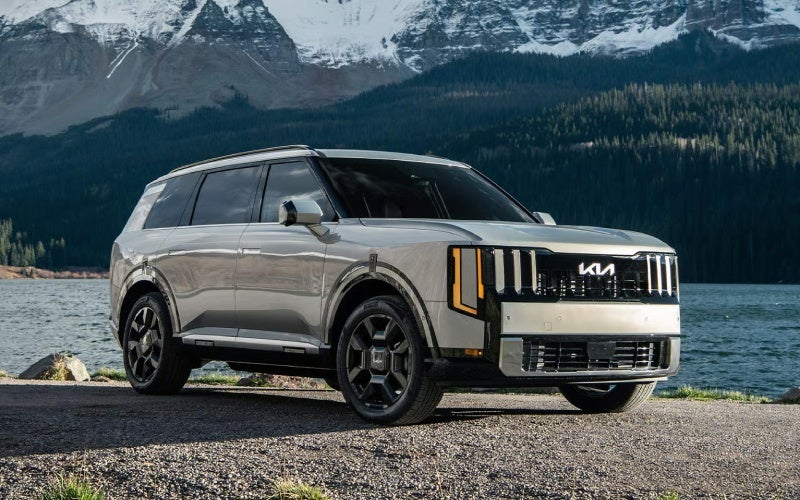
Can I use my phone as the only key for the 2027 Kia Telluride in Philadelphia, PA?

Can I use my phone as the only key for the 2027 Kia Telluride in Philadelphia, PA?

Matt Blatt Kia of Abington - Can I use my phone as the only key for the 2027 Kia Telluride in Philadelphia, PA? If you choose the right trim, the 2027 Kia Telluride lets you go truly phone-first. At Matt Blatt Kia of Abington, we help drivers around Philadelphia, PA set up Digital Key 2.0 so you can unlock, start, and share access to your Telluride using a compatible smartphone. For city life — from Center City parking garages to sports events at the stadiums — leaving the bulky key behind can simplify your day. Below, we break down which Telluride trims include Digital Key 2.0, how it works in real life around Philly, setup tips, and what to consider for seamless daily use. If you want to try it hands-on, our team will demo Digital Key 2.0 on a test drive and help you configure it before you roll off our lot. Which 2027 Telluride trims include Digital Key 2.0? Digital Key 2.0 is available on upper Telluride trims designed for premium convenience and technology. In the 2027 lineup, look for SX Prestige, X-Line SX Prestige, and X-Pro SX Prestige for Digital Key 2.0 along with other high-end features such as the 12-in. Head-Up Display, Full Display Digital Rearview Mirror, and Remote Smart Parking Assist. If you want to live phone-only — no keys, no cords — these are the trims to put on your list. Every 2027 Telluride also comes smartly equipped with tech that supports a phone-first lifestyle, including Wireless Apple CarPlay® and Android Auto™, dual wireless phone chargers, and USB-C ports in all three rows. That way, your device is always integrated and powered for the drive ahead. How Digital Key 2.0 fits Philly driving and living Think about your typical day around Philadelphia — backing into a tight space off South Street, scooting into a garage near Rittenhouse, or juggling kids and backpacks at school drop-off in Chestnut Hill. Digital Key 2.0 makes those moments easier. Unlock with your compatible phone, hop in, tap start, and you’re off. No digging for a fob at the curb on Walnut Street, and no worries if a family member needs the Telluride for an early morning errand — you can share and revoke access digitally. It also pairs naturally with the Telluride’s parking tech when available and actively engaged. Features like the 360° Surround View Monitor can help you visualize lines and curbs in narrow garages, and Parking Distance Warning can provide auditory/visual alerts as you inch into a spot. If you choose SX Prestige or above, Remote Smart Parking Assist can help you guide the Telluride into or out of certain tight spaces while you stand outside — a true stress-saver in crowded lots near the Kimmel Center or the stadium district. Weekend plans? Whether you’re meeting friends at Spruce Street Harbor Park, heading to the Jersey Shore, or taking Lincoln Drive toward Valley Green, the Telluride’s available All-Wheel Drive w/ Terrain Mode and strong turbocharged power make the journey confident. The beauty is that your phone-as-key system goes with you, from city streets to coastal parking lots. Setup basics: what to expect when you go phone-only We set up Digital Key 2.0 with customers daily — it’s quick when you know the steps. Here’s a simple overview so you know what to expect at delivery or during a test drive. Prerequisites: You’ll need a compatible smartphone, an active Kia Connect account, and a Telluride trim equipped with Digital Key 2.0. App sign-in: Download the Kia Connect app, sign in, and verify your account. Pairing at the vehicle: From your Telluride’s infotainment screen, follow the prompts to add a digital key, then complete pairing on your phone. Share access: Through Kia Connect, you can securely share and revoke vehicle access with family members who have compatible devices. Keep a backup: Even when you go phone-first, we recommend keeping the Smart Key or card key accessible during your first weeks as you get comfortable. Exact steps may vary by phone platform and software version. Our delivery specialists can complete the setup with you, confirm your key is active, and help you practice unlocking and starting the vehicle using your phone. Pro tip for SEPTA and regional rail commuters: if you park at Elkins Park, Jenkintown-Wyncote, or 30th Street Station, Digital Key 2.0 means fewer items to carry in and out of garages, rideshares, and platforms — and one less thing to misplace during a busy commute. Security and peace of mind Digital Key 2.0 is built for secure access management. You control who can use your Telluride, and you can remove shared access at any time. If your phone is lost or replaced, sign out of Kia Connect and contact us — we can help you reset access quickly. For added confidence, many Telluride models include a Smart Key with Push Button Start, so you always have a traditional backup method to access and start the vehicle. Planning ahead also helps. If you rely on your phone for access, keep a portable charger in the cabin and enable your Telluride’s dual wireless phone chargers. With tri-zone Auto Climate Control and Kia Connect remote features, you can also precondition the cabin — a comfort booster before a Wells Fargo Center concert or after a summer afternoon at Penn’s Landing — all while staying within your phone-first routine. As with any connected feature, availability varies by trim and device. Certain Kia Connect services may require a subscription after the initial trial. We’ll walk you through what’s included on your chosen Telluride and how to extend services you love. Which Telluride is the best fit for going phone-only? If Digital Key 2.0 is a must-have, start your search here — and consider what else matches your routine around Philadelphia and Montgomery County. SX Prestige: A luxury sweet spot with Digital Key 2.0, the 29.6-in. panoramic display w/ Navigation, Meridian™ Premium Audio, Dual Sunroofs, and advanced driver assistance including Highway Driving Assist 2 when available and actively engaged. X-Line SX Prestige: Adds X-Line style and utility — exclusive 21-in. wheels and high-utility roof rails — ideal for weekend gear runs to Wissahickon or the Shore, while keeping Digital Key 2.0 convenience. X-Pro SX Prestige: If your life mixes city streets with trailheads, X-Pro brings 9.1-in. ground clearance, all-terrain tires, recovery hooks, and X-Pro Ground View Monitor — plus the same phone-as-key access you want for daily life. Whichever path you choose, the Telluride platform makes phone-first ownership feel natural. Wireless Apple CarPlay® and Android Auto™ keep directions and music front and center, while the available Full Display Digital Rearview Mirror helps maintain a clear view even when the cargo area is packed with strollers, coolers, or musical gear after a night in Fishtown. Another everyday advantage is charging flexibility. With intuitively placed dual wireless chargers and standard USB-C ports across all 3 rows, passengers can stay powered — meaning your digital key stays ready — whether you’re on the Blue Route, the Schuylkill, or cruising down I-95 toward South Philly. If you plan to swap vehicles with a spouse or co-parent during the week, Digital Key 2.0 also makes coordination simple. Share access on Monday for a practice at the Germantown Cricket Club, revoke it Tuesday when plans change, then re-share for a weekend grocery run to Reading Terminal Market. It’s easy, trackable, and under your control. Not sure if your current phone is compatible? Stop by our showroom in Roslyn, and we’ll check it together. You can even test Digital Key 2.0 during a drive on Easton Road to see how natural it feels to unlock, start, and go without reaching for a fob. When you purchase from us, we’ll also set up other convenience features that complement a phone-first routine. From setting your Driver Profile to activating Kia Connect remote features and demonstrating Highway Driving Assist 2 on area highways when safe and appropriate, we make sure your Telluride feels tailor-made for life in and around Philadelphia. And when it’s time for service, our Kia-certified technicians and Kia Express Service help you keep everything running smoothly — fast, friendly, and reliable care that respects your schedule. If you ever need help updating apps or refreshing Digital Key access after a phone change, our team is here to assist. Frequently Asked Questions: Does a 2027 Telluride with Digital Key 2.0 still come with a physical key? Yes. Telluride models include a Smart Key with Push Button Start. Even if you prefer using your phone, we recommend keeping the physical key accessible at first as you build new habits. What happens if my phone battery dies while I’m out? We suggest carrying a small charger in the cabin and enabling the Telluride’s dual wireless chargers. If your device is fully unresponsive, you can use your physical key or card key (if equipped), or log in to Kia Connect from another compatible device to manage access. Our team can review backup options during delivery. Will Digital Key 2.0 work with both iPhone and Android? Digital Key 2.0 supports many popular smartphones, but compatibility can vary by model and software version. Bring your device to our showroom and we’ll confirm compatibility and help with setup. Do I need Kia Connect for Digital Key 2.0? Digital Key 2.0 is managed through Kia Connect. Some connected services require an active data connection and may transition to a paid subscription after a trial period. We’ll outline what’s included with your Telluride and how to continue services you use most. Can I share the digital key with family members or caregivers? Yes. You can securely share and revoke access with compatible devices through Kia Connect. It’s a convenient way to coordinate school pickups, visiting relatives, or weekend plans without swapping a physical key. If you’re ready to experience phone-as-key convenience, visit Matt Blatt Kia of Abington at 1515 Easton Road, Roslyn, PA. We’ll help you choose the right 2027 Kia Telluride, set up Digital Key 2.0, and tailor the tech to your everyday routes around Philadelphia. Prefer to start online? Reach out to our team, and we’ll schedule a personalized demo that fits your calendar. Request more 2027 Kia Telluride information